Showing posts with label Production Post. Show all posts
Showing posts with label Production Post. Show all posts
Saturday, 18 January 2014
Production Post 25 - Done!
So now I have completed everything and have created a draft v final video which shows my draft video against my final video and the difference between the two. You can hopefully see the improvements made such as quicker cuts at certain points, colour corrections, different scale sizes on certain shots, more movement and the removal of the shots which didn't fit in with the feel and style of the rest of the video. The magazine advert and Digipak are complete with improvements made. All of my planning tasks have been completed too in order to make sure that I made every step of the process as detailed and easy as possible.

Friday, 3 January 2014
Production Post 24 - Finishing off
This week I finished off all my posts including Planning, Research and Finals. I managed to complete all my brand guidelines and health and safety posts which highlight how I have used my logo throughout all my productions and also how I can ensure that my filming atmosphere was as safe as possible and that all possible risks were highlighted and avoided. I finished editing my final video in Premiere after using many tools to enhance the quality and realism such as colour correcting and added more movement by zoom in and out of the still shots. My magazine advert is complete and so is my digipak. These have both been edited and re-edited after listening to my audience feedback where I asked various members to comment on the quality and possible improvements.
Wednesday, 18 December 2013
Friday, 6 December 2013
Production Post 22 - Changes to my Idea
This week I have made a few posts highlighting the changes I have made to my music video from my initial ideas. I decided to do this so that it clarified exactly why I changed my idea and why the final product would have looked so completely different to the initial ideas. I also completed my first draft of my video and exported it using Vimeo.com
Saturday, 30 November 2013
Production Post 21 - Feedback
This week I have been trying to gather back some feedback for my Music Video which I have shown a few people. I will upload all the feedback as one when I gather some more from my targeted audience. I have also been continuing to design my digipak and edit my magazine advert. I am also hoping to finish a couple of my evaluation questions before we break up for Christmas so this will relieve the stress of waiting until everyone else is at the same stage as me. I feel this will allow me to develop my evaluations to the best they can be and will also familiarise me with everything I will need to include in the exam. Over the weekend I hope to update my blog with all the necessary posts needed for the completion of my Music video.
Monday, 25 November 2013
Production Post 20 - Final/Draft Video
Today, I managed to render out my final music video. As I filmed my last bit of footage, I just had to fill in the remaining gaps in my Preimere project. I created a draft which I chose to adapt into my final submission. There were some parts which I wasn't happy with so altered them slightly before uploading the video to Vimeo. I am now able to focus and finish my Ancillary tasks of the Magazine Advert and Digipak. I did create one version for the Magazine advert but I feel now that it doesn't fit in with the overall look and theme of my music video so I am going to create a separate one which is more related. I will most likely use the one I have already created as a magazine advert for a separate single on the album which could be more related to the song.
Tuesday, 19 November 2013
Production Post 19 - Props
In the past couple of lessons I have been planning this evenings filming session. I am hoping to film my final scene and have been working out how much time I have left on my video and also all the props I will need for the filming. I worked through my premiere file and added up all the blank parts which amounted to about a minute which is perfect as I have done 2 scenes already which have taken up 2 minutes. I then wrote a list of everything I will need to take to my nan's house where I will be filming this scene. The list is shown below. Hopefully tonight's footage is successful and I will upload a few time lapses of the evening.
- Chinese Lanterns
- Icicle Lights
- Red Head Lights
- 2 Cameras
- Tripod
- Dress
- Sparklers
- Extension Lead
- Tea Lights
- Jam Jars
- Chinese Lanterns
- Icicle Lights
- Red Head Lights
- 2 Cameras
- Tripod
- Dress
- Sparklers
- Extension Lead
- Tea Lights
- Jam Jars
Wednesday, 13 November 2013
Production Post 18 - Dance Scene Practice
Today I filmed Clare in the school hall. I wanted to practice the types of shots I was going to use with Mollie when I film the dance scene. Obviously I was in the wrong location and the lighting was incorrect but I was able to film little shots of Clare which I thought would look effective. I used the steady cam to make it look smooth and to flow better. I put together the footage I took into a short video and slowed some bits down to make them stand out more.
Friday, 18 October 2013
Production Post 17 - Light Streak Creation
 I wanted to create a light streak photo by using a slower shutter speed. I had researched online to find good tips on how to create an effective photo with ease. I went to Swakeleys Roundabout and changed the cameras shutter speed to around 13 seconds. I ended up with a few good shots but my favourite was the photo at the top
 < I opened it up in photoshop and increased the brightness and contrast and also altered the hue/saturation settings so that it had the bright, colourful look that is in the photo at the bottom.
 I love the effect is has and it ties in with my magazine advert as it caputures movement. It also adds another effect of colour and lights which is vital for my music video as the who video is going to be different forms of light and movement being shown such as Sparklers, Glow Sticks, Chinese Lanterns, Fairy Lights and car Time Lapses.
Thursday, 17 October 2013
Production Post 16 - Digipak Designing

Friday, 11 October 2013
Production Post 15 - Idea Explanation and Feedback
Here is a presentation that I repeated to the class to try and gain some feedback from a group that are the majority of my target audience. I managed to explain my entire idea to them and also show my blog progress so far. This activity helped me in the way I could finally say out loud my idea and get other peoples opinions on it. Luckily enough they all liked my idea and gave me a few suggestions will will be posted on my blog at a later date where I can add in possible improvements.
Monday, 7 October 2013
Production Post 14 - Progress
I chose to make a Prezi this week to show my past work, present work and also what I hope to be working on in the next week coming.
Monday, 30 September 2013
Production Post 13 - Magazine Advert Planning
Today I carried on with designing my Magazine Advert draft and was thinking of ideas that I could use which would create a running theme through the Advert and the Digipak. I came to the conclusion I wanted the photo to consist of scenery and have a female in three or more difference stages of a spin but on the same, still backdrop. I could either take 3 separate photos of her and merge them together afterwards on photoshop - or I could slow down the shutter speed so that the shot was open for longer and could capture more. I really wanted to have the blurry, motion effect on the female so I experimented with both ways. I put together a video of all the pictures I took and sped it up. This shows how many pictures I tried out and explains my idea much better than in words. The photos I choose should hopefully be inserted into my magazine ad on indesign soon and that should finish off the magazine ad.
Wednesday, 25 September 2013
Production Post 12 - Magazine Advert Drafting
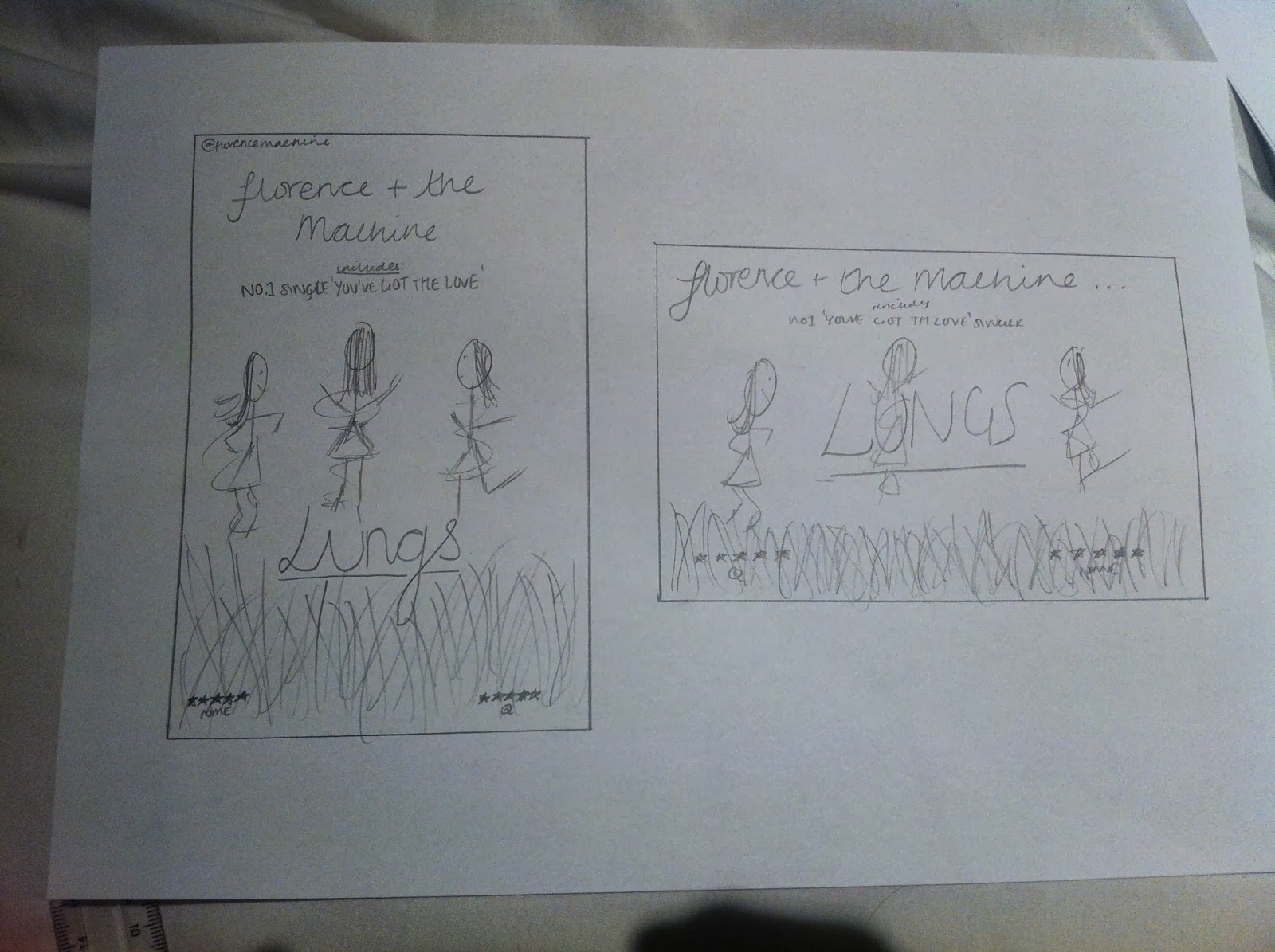
Yesterday, as I am waiting for my two performers to both be free so I can film my music video I decided to crack on with the additional task of the Magazine Advert. I used the prior research to help me get a generic idea of what they need to and don't need to include. Underneath is my draft of the Ad without a photo - I hope to take the photo for it sometime next week once I have thought of a unique and original idea so it doesn't look like the typical, generic mag ad. I drew one on paper which were my initial thoughts. As you can see form both the PowerPoint draft and paper draft that I am going for a photo which contains 3 or more separate images of the same person in the different stages of a spin. This has an underlying meaning which ties in with the album title "Lungs". The photo will be taken outside and this shows fresh air and freedom and the blurry motion photo shows that the girl is escaping very slowly and that her lungs are running out of breath.

Wednesday, 18 September 2013
Production Post 11 - Audience Feedback
As I said, I managed to get some audience feedback for my idea's so far and have put together a video with the audience members discussing what they like and also what they dislike about my idea. I will use all the feedback to try and change my idea in such a way that I won't have to start again but just adapt and evolve the ideas I have already.
Wednesday, 4 September 2013
Production Post 10 - Research Complete!
This past week I have finally managed to complete all the research tasks bar a few which will have to be done throughout the course of the year such as the audience research and feedback. This now means that I can focus completely on the planning of the music video and also my magazine and digipak. Over the next week I hope to get some audience feedback on my music video idea and story board and try and gather together some constructive criticism to help me improve the quality of my music video and make it the best that it can be.
Wednesday, 28 August 2013
Production Post 9 - Hair Styles

 Last lesson I was trying to find hairstyles which I wanted to recreate on Mollie. I want her hair in a high messy bun as she walks into the studio so was trying to find the perfect style that looks attractive but also messy and casual. She then unties her hair in the studio long curly/wavy hair is seen - I haven't decided whether to have it half up, half down or not yet. I will create these waves with the use of heated rollers which give a natural bounce to your hair along with lots of volume and umph! When Mollie is performing the final routine all dressed up in her glamorous outfit, I want her hair to be long and curly but neater than it was in the studio so it looks more professional and glam.


Tuesday, 20 August 2013
Production Post 8 - Outfit Ideas
Since I've been back at school, I have began to finish up all my research tasks in order for me to gather all the necessary information and knowledge so I can crack on with the planning and construction stages of the task. Over the past week I have also been looking out for outfits that I could possibly use in my music video and get my dancer, Mollie, to wear. I am trying to get a few outfit ideas each week leading up to the shooting so I can have a variety of choices and see what one looks the best on camera. I will upload a video when I have found all the desired looks and put them together so it's clear what sort of look I am aiming to achieve through the costumes.
Tuesday, 13 August 2013
Tuesday, 6 August 2013
Production Post 6 - Research and Planning
Over the summer I have been gradually completing various research tasks in order to help me when filming and editing my music video. I researched into Music Video Directors and Music Labels. Over the summer I also planned on filming my music video but unfortunately my performers weren't available at the same time and have moved the filming to September. So I didn't waste having all the equipment from school I decided to go to the venue I had found with two girls from my media class to make a virtual storyboard. I took photos of each shot - by following my shot list. The storyboard will be posted up shortly to show the flow of the music video and the exact shot. I also filmed the two girls dancing at "Auditions" this shows that I have thought about who I want in my video and that I am not willing to use just anyone and they have to be able to perform.
Subscribe to:
Posts (Atom)